BugSnapper Developer Guide
Introduction
Welcome to the Developer Guide. As a developer, this guide helps you understand how you can set up the development environment. It is designed to provide you with the necessary information to effectively contribute to the project.
Purpose of this Guide
The main objectives of this guide are to:
- Orient new developers to the software's tech stack.
- Provide a brief overview of the software architecture.
- Detail the setup process for a development environment.
Product Overview
BugSnapper is a web-based bug analysis tool built to support the SQLancer ecosystem by providing insights into bugs across open-source DBMSs like DuckDB, TiDB, and CockroachDB.
BugSnapper is built for learning, contribution, and practical impact in database testing — and there’s lots of room for you, as a developer, to shape where it goes next!
Tech Stack
BugSnapper is built using a modern full-stack architecture, combining a responsive React frontend with a lightweight Python-based backend and a robust PostgreSQL database. Here’s an overview of the technologies powering the project:

| Layer | Technology |
|---|---|
| Frontend | React |
| Tailwind CSS | |
| Material UI | |
| Backend | FastAPI |
| SQLAlchemy | |
| OpenAI API | |
| GitHub API | |
| Database | PostgreSQL |
| Testing | Pytest |
| React Testing Library | |
| Deployment | Vercel (Frontend) |
| Render (Backend) |
Architecture Overview
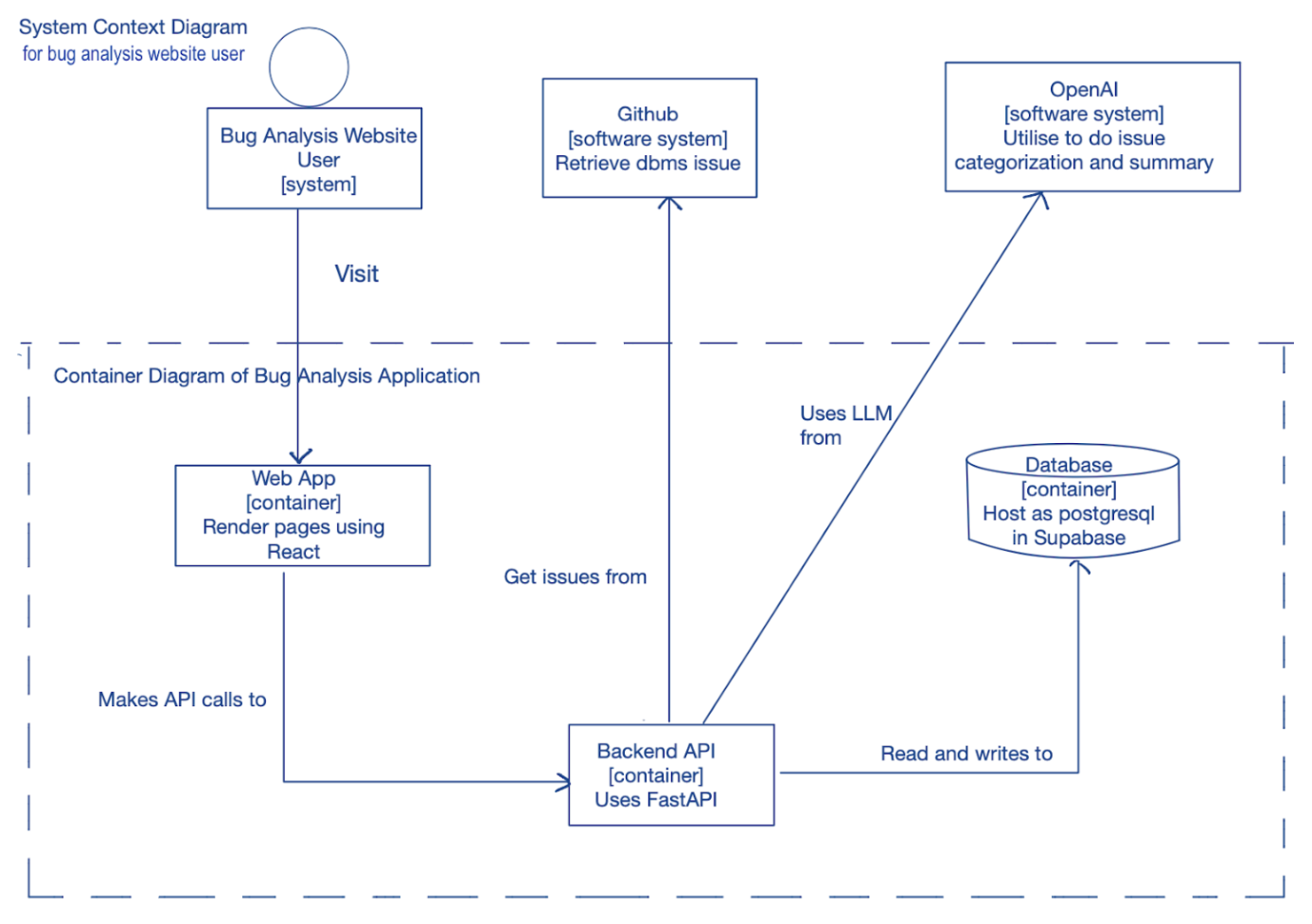
BugSnapper is built using a modular architecture designed for maintainability and extensibility. The system follows a clear separation of concerns between the frontend, backend, and supporting services.
System Overview
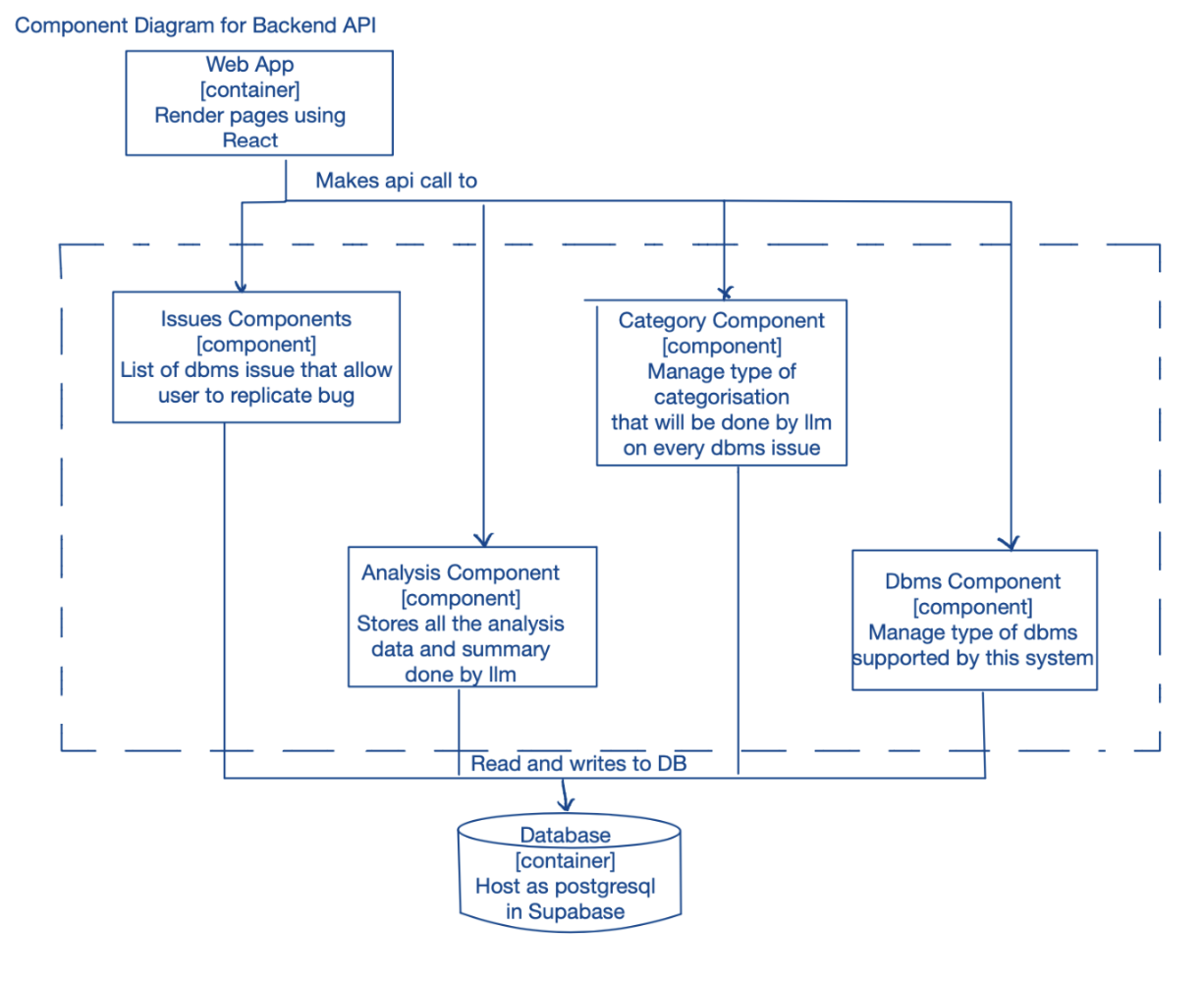
Backend Component Overview
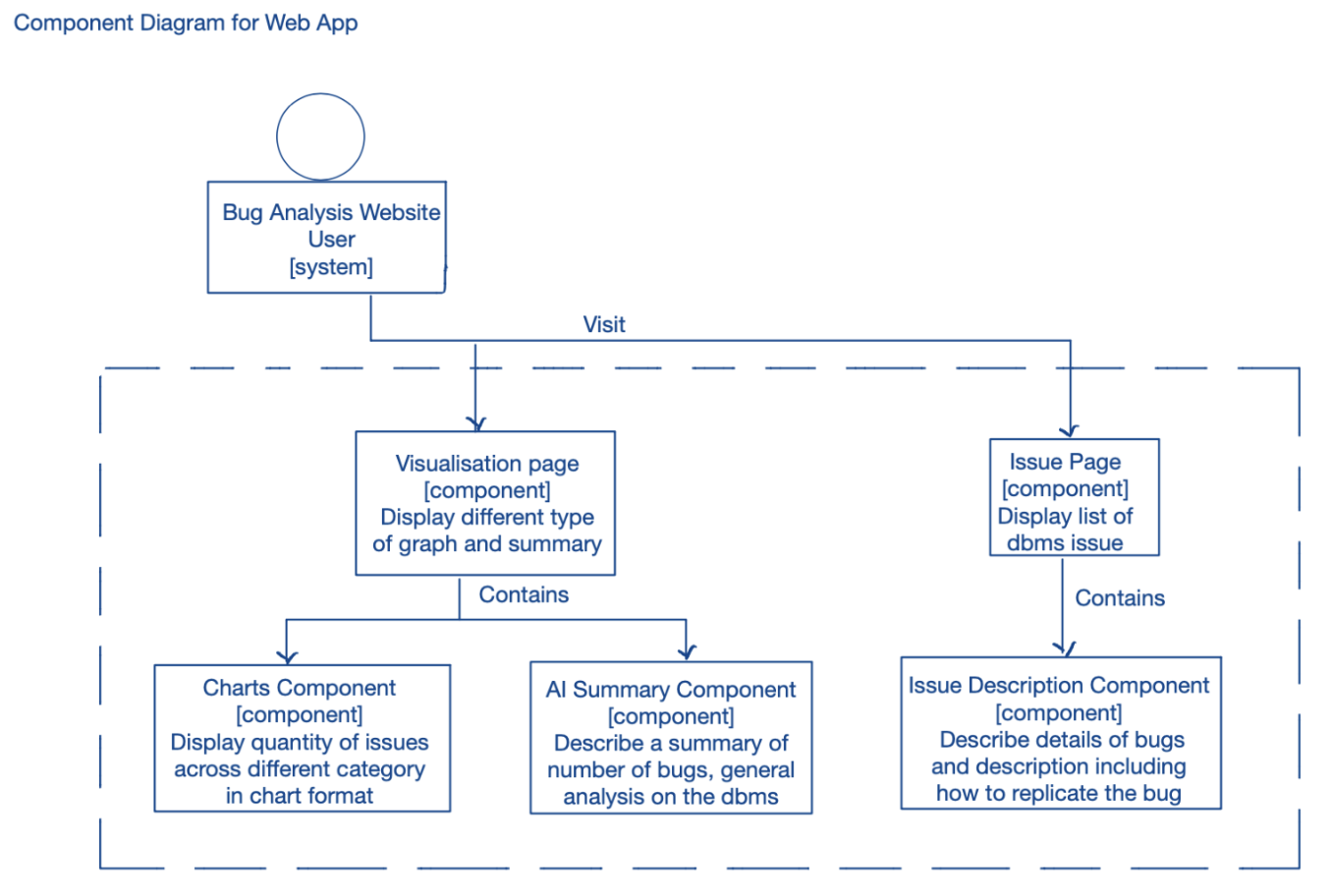
Web App Component Overview
Implementation
This section describes some noteworthy details on how certain features are implemented.
Scheduler
The Scheduler is a backend feature that automates Github bug data fetching and updating on a scheduled basis (e.g., weekly). This ensures that the BugSnapper always reflects the most accurate, relevant, and timely information without requiring manual intervention.
Function
Auto Fetch GitHub Issues: Periodically pulls new issues from GitHub repositories and updates the Bugs List Page.
Sync Updates to Existing Issues: Refreshes existing bug data, such as:
- Updated bug issue status (e.g., from open to closed)
- Updated Time to Fix
- Changes in bug descriptions or title
Auto Update Visualizations: Keeps charts on the Visualisation Page current by updating the following charts:
- Mean TTF Across DBMS
- Number of Bugs Found Across DBMS
- Bug Distribution Across Categories
This makes the Visualisation Page a reliable source of truth for data-driven decisions.
Importance
With the Scheduler:
- Always up-to-date: BugSnapper evolves alongside real-world data. Users will always see the most recent and accurate bug data
- Data you can trust: Users can make informed decisions based on accurate, current metrics.
- Efficient workflows: Users save time and gain insights effortlessly as there is no need to manually track multiple sources.
Non-Functional Requirements
Maintain ≥99.9% uptime with automated failover to redundant DB clusters during outages.
- Ensures high availability by keeping the system operational 99.9% of the time (less than 8.76 hours of downtime per year).
- Uses automated failover to switch to backup database clusters instantly if the primary cluster fails.
- Prevents service disruptions and enhances reliability.
Compatible with GitHub issues from multiple DBMS including TiDB, DuckDB and CockroachDB.
- Ensures the system can integrate and process GitHub issues across multiple database management systems (DBMS).
- Supports a wide range of DBMS making it flexible and extensible.
- Helps users analyze bugs from diverse database ecosystems without compatibility issues.
Achieve less than 800ms average response time for API queries.
- Guarantees that API responses are fast and efficient, ensuring a smooth user experience.
- A response time of less than 800 milliseconds prevents delays in data retrieval and visualization.
- Optimizations like caching, indexing, and query tuning help maintain performance.
Implement automated regression testing achieving ≥90% test coverage for core classification algorithms through GitHub Actions workflows.
- Automated regression testing to check core classification algorithms after updates.
- ≥90% test coverage to ensure most of the code is tested.
- Uses GitHub Actions workflows for automatic testing.
Appendix: Planned Enhancements
Given below are the planned enhancements for the application.
1. AI Model Retraining and Enhancement
BugSnapper leverages AI across several key features:
- AI Categorisation of bug issues
- AI Summarisation of overall statistics and analysation of overall bug trends for each DBMS
- AI-based DBMS Recommendations based on user prompts
- AI-generated solutions for each bug issue
To ensure these models remain effective as datasets evolve, we plan to:
- Periodically retrain models on fresh, annotated data
- Improve classification precision and relevance
- Incorporate user feedback into training datasets
This will improve the accuracy, contextual relevance, and trustworthiness of AI-generated content.
2. Expand Support for More DBMS Platforms
Currently, BugSnapper supports three major DBMS systems. To provide broader comparative insights, we plan to integrate additional DBMS options. This will allow users to analyze bug trends across a wider ecosystem and make more informed decisions for projects involving diverse database technologies.
3. Fetch Bug Issues from Multiple Sources
Beyond GitHub, the platform aims to pull bug data from other reputable sources such as public bug trackers, DBMS vendor forums, or specialized issue aggregation sites.
Broadening the source pool will help capture a richer and more diverse set of bug reports, reducing source bias and improving overall bug coverage.
4. Enhanced Category Support and Classification
Currently, BugSnapper uses a fixed set of bug categories. The goal is to:
- Allow AI to generate more refined and granular categories dynamically
- Expand the Visualisation Page to reflect these additional classifications
- Enable admins to manage and curate categories more flexibly
This enables deeper insights into specific issue types, improves filtering options, and helps users quickly zero in on areas of concern.
5. Enhancing the User Interface
At present, BugSnapper's line chart visualization can suffer from cluttered axis labels—particularly along the month and year axis—when displaying a large number of data points within a single, static view. This makes it difficult for users to clearly interpret the timeline and trends over extended periods.
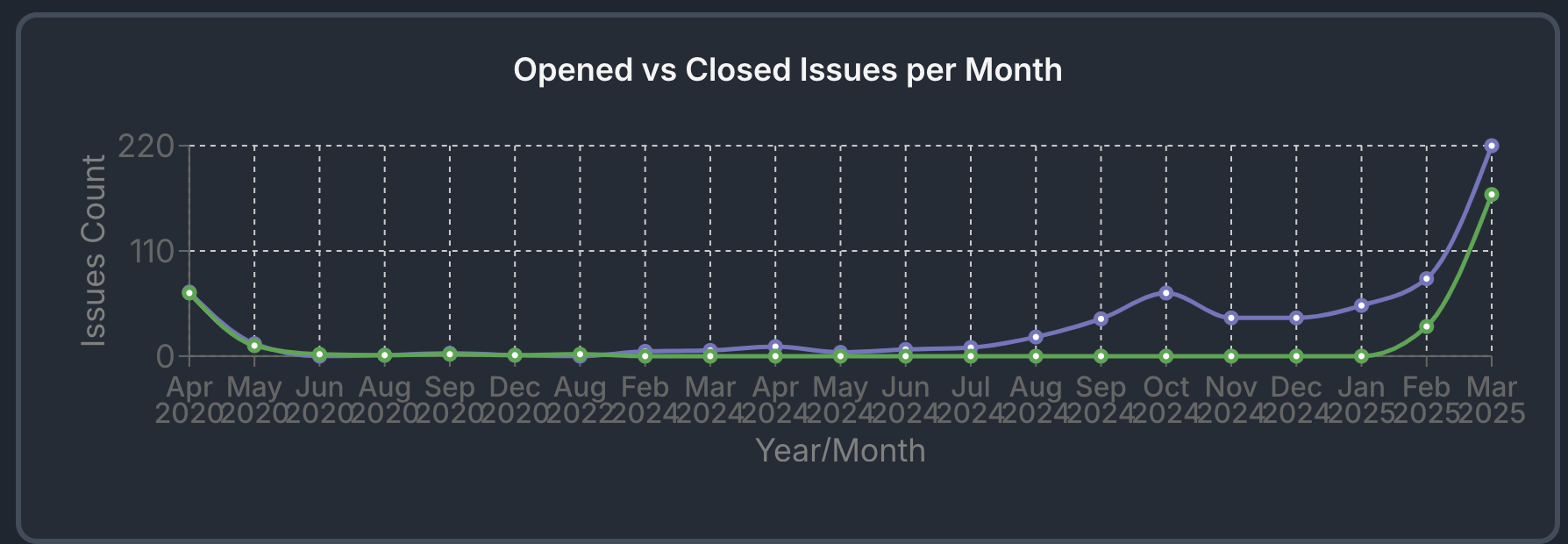 Visualisation Chart
As a future enhancement, we aim to improve the chart's usability by introducing a scrollable timeline or zoomable interface, allowing users to interactively explore the data in more manageable segments. This enhancement will not only improve readability but also enable more detailed and focused analysis, ensuring a smoother and more intuitive user experience when tracking bug trends over time.